Enterprise calling, SMS, and fax integrated into Microsoft Teams—without Microsoft licensing fees, without downtime risk, without compromise.
PanTerra Teams App brings enterprise-grade calling, business SMS, and fax directly into your Microsoft Teams environment as a dedicated application. Your team gets all their communications in one place—the Teams interface they already use every day. When Teams inevitably goes down? Our intelligent failover automatically routes to Streams.AI apps, so your business keeps running.
You're already paying for Microsoft 365. Now Microsoft wants $8-12 per user per month MORE just to make phone calls in Teams. That's $9,600-$14,400 annually for just 100 users—on top of your M365 subscription.
Why pay Microsoft twice for what should come standard?
Microsoft's admin portal is barebones at best. Settings scattered across multiple admin centers—Teams Admin Center, M365 Admin Center, Azure Portal, PowerShell scripts for anything useful. Want to build call flows? Hope you know PowerShell. Need to manage desk phones? Good luck finding those settings. When issues arise, you're stuck opening support tickets and waiting.
Your IT team deserves better tools.
Teams has experienced 112+ outages since August 2023. That's one significant outage every 4-5 days. When Teams goes down, businesses using Microsoft Teams Phone are completely offline. No calls. No meetings. No work.
Can your business afford to stop?
The enterprise UCaaS application that works inside Microsoft Teams WITH
automatic failover protection when Teams goes down.
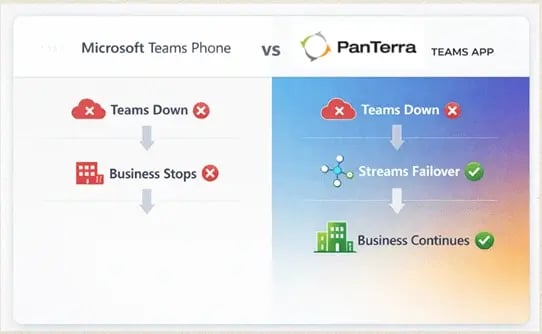
Teams goes Down
Business Stops
No Failover
Protection
Teams goes Down
Streams.AI Failover
Business Continues
Automatic Business Continuity
NORMAL BUSINESS HOURS
Your team works entirely within Microsoft Teams—no separate applications, no additional logins. PanTerra Teams App integrates directly into the Teams interface your employees already use.
Click-to-call from any contact
Company number messaging
HIPAA-compliant transmission
Zero training required. Maximum productivity from day one.
DURING TEAM OUTAGE
When Microsoft Teams experiences downtime, our intelligent monitoring system detects the outage within seconds andautomatically routes communications to our Streams.AI infrastructure.
System identifies Teams unavailability
Automatic failover to Streams.AI App (no s)
Business continuity maintained
Mobile Apps
Desktop Apps
IP Phones
Your business stays connected. Your customers still reach you. Your employees keep working through the teams outage.
TEAMS SERVICE RESTORED
When Microsoft Teams experiences downtime, our intelligent monitoring system detects the outage within seconds andautomatically routes communications to our Streams.AI infrastructure.
Service restoration detected
Seamless transition initiated
Back to Teams interface
Business continuity insurance built directly into your daily workflow—invisible until you need it, invaluablewhen you do.
Access PanTerra Teams App directly within Microsoft Teams as a dedicated application tab. Make calls, send SMS, transmit faxes—all from the Teams interface your team already uses.
Benefit: Your team works entirely within Teams. No separate applications to open. No training required.
When Teams experiences an outage, communications automatically fail over to PanTerra Streams.AI applications and IP phones. Zero configuration. Zero downtime. Zero manual intervention.
Benefit: Never lose a customer call or miss a deadline because of a Microsoft outage. Your business continues operating while competitors wait for Microsoft service restoration.
Get enterprise calling within Teams without paying Microsoft $8-12/user/month for Teams Phone licenses. Leverage your existing M365 investment without additional Microsoft fees.
Benefit: Save $9,600-$14,400 annually per 100 users compared to Microsoft Teams Phone.
Complete business phone system capabilities built into the platform.
Benefit: One platform for internal communications AND customer-facing operations. No separate call center solution required.
The Streams.AI Admin AI Portal is what Microsoft's Teams Admin Center should have been—powerful, intuitive, and actually useful for real IT work.
Everything in ONE place. No switching between portals. Train admins in 2 hours, not 2 weeks.
Real-time monitoring. Remote diagnostics. Zero- touch provisioning for all endpoints.
Drag-and-drop interface. No PowerShell required. Test before deployment.
Natural language processing. Context-aware routing. 60%+ reduction in misdirected calls.
Bulk operations. RBAC. Complete audit trail. Advanced search and filtering.
CDR filtering. Usage patterns. Cost analysis. Custom report builder.
Benefit: Your IT team resolves issues in minutes instead of hours. Deploy new locations in days, not weeks. Manage thousands of devices from one interface. Build sophisticated call flows without coding.
Single sign-on, automated user provisioning, unified identity management. Integrate with your existing Azure AD (Entra ID) using industry-standard protocols.
Benefit: Simple deployment in days, not months. Centralized control. Enhanced security. No duplicate identity management.
Award-winning. Powerful. Actually useful for real IT work.
Microsoft spreads Teams Phone administration across multiple portals:
Result: Your team wastes hours hunting for settings, switching portals, and scripting workarounds for basic tasks.
The Streams.AI Admin AI Portal Difference:
Result: Your IT team finally has tools that work the way they think.
Configure in minutes what takes hours in Microsoft's portals:
See status of every endooint in real-time.. desk onones, moolie doos, desktoo clients
Troubleshoot device issues without touching the device. View network status, registration state, firmware version
Pre-configure devices before they arrive. User plugs in, device auto-configures
Deploy firmware updates to 100 devices simultaneously. Change settings across entire locations
Create device templates by role, department, or location. Deploy consistent configs in seconds
Receive alerts before devices fail. Identify patterns across your deployment
Your Chicago office reports phone issues at 2pm.
Your Chicago office never loses productivity.
Microsoft requires: Power Shell scripts, regex patterns, trial-and-error testing across multiple admin centers.
Streams provides: Drag-and-drop visual interface.
Build complex call routing:
Your sales team needs different routing on weekends vs. weekdays, with overflow to voicemail after 3 rings, unless it's a VIP caller (identified by caller ID), who should always reach on-call manager.
Microsoft: Write PowerShell script. Test. Break production. Write another script. Repeat.
Streams: Drag boxes. Connect arrows. Set conditions. Test with simulator. Deploy. Done in 5 minutes.
*Press 1 for sales, press 2 for support, press 3 for billing, press 4 to hear these options again..."
"I need to talk to someone in sales about renewing my contract."
Account Management queue (not new sales queue), flags as renewal opportunity, provides context to receiving agent.
Configuration: Build Luna's knowledge base visually in the admin portal. Define routing rules using drag-and-drop interface. No coding. No AI expertise required.
Microsoft approach: Add users one by one (or in small batches that frequently time out). Configure settings individually. Manually assign phone numbers. Cross fingers. Fix failures individually. Takes 3-4
Streams approach: Import CSV with all users and settings. Review in preview mode. Execute bulk operation. Monitor progress dashboard. Entire location provisioned in 2 hours.
Built-in reports (no third-party tools required):
PanTerra Teams App integrates directly into Microsoft Teams—your team
already knows how to use it.
Click the PanTerra icon in Teams' left navigation rail. Opens as a dedicated tab—just like SharePoint, Power BI, or any other Teams app.
Teams Sidebar Integration
Enterprise calling with full PBX features, all within Teams.
Click-to-call from any contact
Dial pad for external numbers
Call history & active controls
Mute, hold, transfer, record
Call Interface
Professional SMS/MMS from your business number.
Text customers from business number
Full conversation history
Send images & files via MMS
Group messaging supported
SMS Interface
HIPAA-compliant fax transmission for regulated industries.
Upload documents to fax
Receive faxes as PDFs
Complete fax history & archive
HIPAA-compliant transmission
Fax Interface
Unified communications directly in Microsoft Teams — no context switching, no additional logins, no training required.
Automatic failover in under 60 seconds—your business never stops.
99.9% of the time
0-60 seconds
60+ seconds
All communications route to Streams applications:
Streams.Ai Mobile App
Streams.Ai Desktop App
IP Desk Phones
During failover: Inbound calls route to user's
designated failover device. Users access
voicemail, call history, and contacts. Business
continues operating normally.
Automatic
IT Administrator Role
Nothing. The system handles
everything automatically—you can
focus on strategic initiatives.
Business Impact
Your customers and employees
experience seamless service
continuity.
CEO's Perception
Leadership sees reliable,
professional communication
infrastructure.
Security. Automation. Simplified Management.
PanTerra Teams App integrates directly with Microsoft Entra ID (Azure Active Directory),giving you enterprise-grade identity management without additional complexity.
Users authenticate with their existing Microsoft credentials. No separate passwords. No additional login screens. Secure, seamless access to PanTerra Teams App within Teams.
Protocols: SAML 2.0, OAuth 2.0
Add a user in Entra ID → Automatically provisioned in PanTerra Remove a user in Entra ID → Access instantly revoked across all systems
No manual administration. No security gaps.
Standard: SCIM-based synchronization
Manage permissions, policies, and access from your existing Entra ID console. One administrative interface for Microsoft 365 and PanTerra.
Inherited policies: MFA, conditional access, RBAC, audit logging
Best Admin Portal
The Streams Admin.AI Portal—the same interface that manages your Teams App deployment—has been recognized as the industry's best unified communications management portal.
What sets it apart:
Teams Platform Integration
PanTerra Teams App meets Microsoft's certification requirements for Teams ecosystem integration, validating security, compatibility, and enterprise readiness.
Enterprise Security & Compliance
Independent audit validation of our security controls, data protection, and operational procedures.
Healthcare-Grade Privacy
Business Associate Agreement (BAA) available. Complete Audit trails. Encrypted communications end-to-end.
PanTerra's Teams App isn't a startup experiment—it's the latest innovation from a platform that's been delivering enterprise communications since 2001.
The same infrastructure powering these mission-critical deployments now extends to your Microsoft Teams environment —enterprise reliability where your users already work.
Battle-tested platform (25 years of enterprise UCaaS)
Award-winning management tools (recognized by industry experts)
Microsoft-certified integration (validated by Microsoft's standards)
Enterprise-grade security (SOC 2, HIPAA, comprehensive compliance)
Battle-tested platform (25 years of enterprise UCaaS)
Award-winning management tools (recognized by industry experts)
Microsoft-certified integration (validated by Microsoft's standards)
Enterprise-grade security (SOC 2, HIPAA, comprehensive compliance)
See exactly how much PanTerra saves you vs. Microsoft Teams Phone and other
UCaaS platforms.
1
2
3
4
Average Time to Full Deployment: 11 days
Coordinating communications across 5, 10, or 50 locations with different phone systems creates chaos. IT teams waste hours managing multiple platforms.
Unified management console for all locations. Single dial plan. Centralized call routing. Deploy new locations in hours. Remote device management eliminates site visits.
Retail chains, healthcare networks, professional services firms, franchises
Employees working from home, offices, and on-the-go need consistent communication experience. VPN hassles and separate apps kill productivity.
Work in Teams from anywhere. Mobile app failover for true flexibility. No VPN required. Same experience in office or at home.
Professional services, technology companies, consulting firms, distributed teams
Sales and support teams need reliable calling, call recording, CRM integration, and intelligent routing-not basic consumer features.
Built-in call center. Skills-based routing powered by Luna.Al. Call recording and analytics. Salesforce & HubSpot integration. Queue management dashboard.
Sales organizations, customer support teams, call centers, service businesses
HIPAA, FINRA, SOC 2 compliance requirements make many UCaaS platforms non-starters. You need audit trails, encryption, and certifications.
HIPAA-compliant. SOC 2 Type II certified. Complete audit logging. Encrypted at rest and in transit. Granular compliance reporting.
Healthcare, financial services, legal, government contractors
Built for technical teams who demand powerful, flexible, automation tools.
When Teams goes down, PanTerra's intelligent routing system automatically fails over communications to our Streams.IA Mobile and Desktop apps and IP phones. Your employees receive notifications, calls are rerouted, and business continues uninterrupted.
When Teams comes back online, everything seamlessly switches back. Most users don't even realize Teams was down.
No. Your team works 100% inside Microsoft Teams for their daily communications—calls, SMS, faxes, everything. They simply click the PanTerra icon in Teams' app rail.
They only see the Streams.IA apps during a Teams outage, and those apps are intuitive and require no training.
For power users who prefer it, Streams.IA apps are available anytime as an alternative interface.
Most customers are fully deployed in 10 business days:
Pilot deployments can be live in as little as 3 days
Yes. We handle the entire number porting process, coordinating with your current carrier. In most cases, numbers port within 5-7 business days with zero downtime.
PanTerra delivers carrier-grade call quality with: Our infrastructure is the same carrier-grade platform that's powered thousands of enterprise deployments for 25 years.
Our infrastructure is the same carrier-grade platform that's powered thousands of enterprise deployments for 25 years.
PanTerra integrates with Microsoft Entra ID (Azure AD) using industry-standard protocols:
Your IT team configures the integration once, and user management is fully automated from that point forward.
The Streams Admin Portal won the INTERNET TELEPHONY Excellence Award for a reason:
It's what Microsoft's admin centers should have been from day one.
Luna AI is our intelligent receptionist that uses natural language processing to understand caller intent and route calls intelligently.
Traditional auto-attendant (including Microsoft's):
"Press 1 for sales, press 2 for support, press 3 for billing..."
Luna AI:
Caller says naturally: "I need help with my invoice from last month"
Luna IA understands: Billing inquiry, existing customer, account-specific
Luna IA routes to: Billing specialist with context
That would be wonderful! But consider:
PanTerra customers get those features today, at a competitive price, with better tools.
Absolutely. We offer:
We're confident you'll love it, but we want you to see it in action first.
See PanTerra Teams App in action. Live demo. Your environment. No pressure.
30 minutes. Your schedule. Worth your time.