Work smarter with your new AI receptionist
Live transcripts during every call and meeting, and an AI summary the moment it ends. Built right into Streams AI.
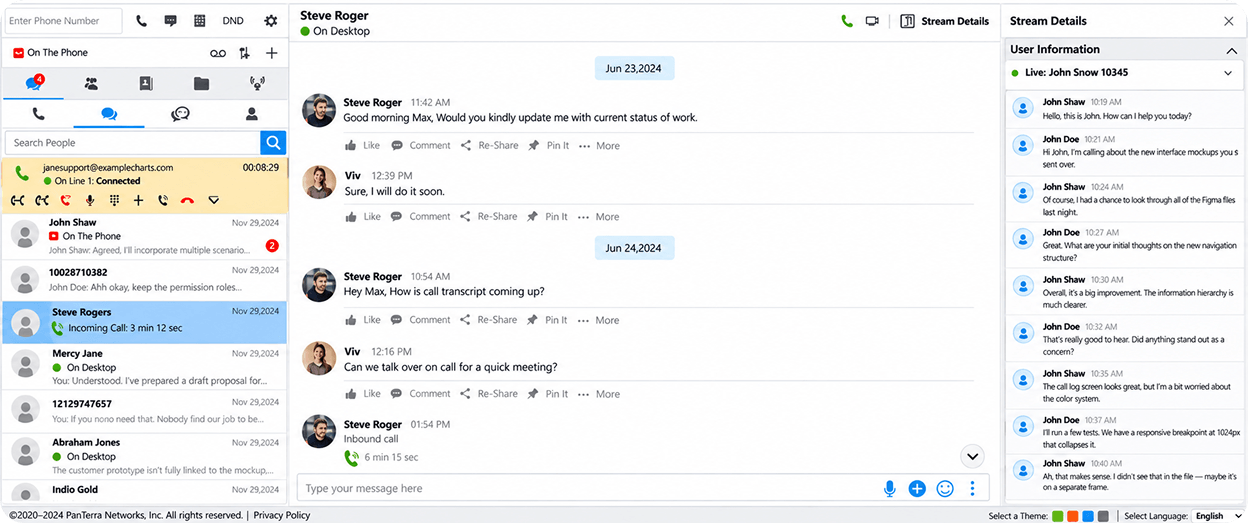
See the conversation in text as it happens, with speaker labels and timestamps. It works on phone calls and Connect meetings.
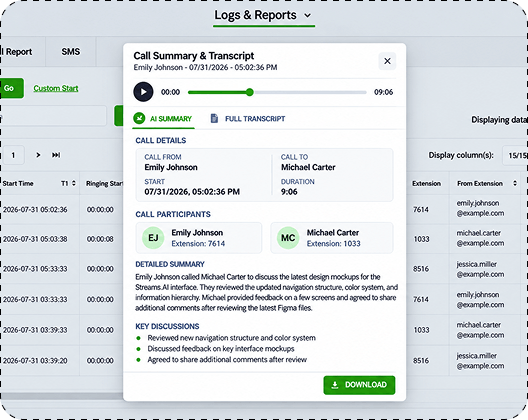
When the call or meeting ends, an AI summary lays out the key discussion points and action items.
Summaries are saved in Streams AI and the text is searchable, so you can find what was said without replaying the recording.
Get a summary with call details, participants, key discussions, and action items.
Open the full transcript and click any line to jump the recording to that moment.
Find every summary in Phone > Summaries, Recents, and Recordings.
Read the live transcript beside chat while the meeting runs.
Get an AI meeting summary as soon as the meeting ends.
Turn it on for one meeting, or make it your default.
Find the summary, transcript, and recording together in Past Meetings.
Choose Standard or Pro for each user. Every user’s included minutes go into one pool for the whole account.
20 hours of calls and meetings
100 hours of calls and meetings
Minutes are pooled across the whole account, not locked to each user.
Phone calls and Connect meetings draw from the same pool.
Usage beyond the pool is billed per minute.
Both plans include the same features.
No. Call recording is separate and free. A summary works on its own; when a call is also recorded, the recording plays in the same view.
No. Voicemail transcription is a separate Streams AI feature.
Yes. Phone calls and Connect meetings draw from the same account-wide pool.
Yes. Admins turn it on per user and choose Standard or Pro, one at a time or for several users at once. It is not available for common seats, virtual extensions, or shared lines.
Minutes beyond the pool are billed per minute across the account. Your PanTerra sales rep can walk you through the rate.
Summaries and transcripts are read-only. Users can copy them, email them to their own address, or download them as a text file.
Tell us how many users you have and how your team works. A PanTerra specialist will put together a quote for your account.